meaningful testimonial
voice testimonial
Showing posts with label presentation. Show all posts
Showing posts with label presentation. Show all posts
Sunday, June 1, 2008

Saturday, May 24, 2008
Organizing content in Spry
Organizing the Content
The AJAX (Adobe Spry framework) can dramatically condense the number of pages of the website, by organizing the content in two levels: 1) dyanimc data and 2) mulitpane widget.
Example
There are many ways to organize the information. The objective here is not to re-invent the wheel and get a free ride from Adobe SPRY framework. Let us use an example, the existing Promotion Oracle website, to demonstrate one of the possible way to organize the content using SPRY Widget. First, we divide up the content as the diagram below. There are different design views to the site layout. Some people like to fit all content on one page and eliminate the navigation buttons entirely; but others would prefer to display to a the screen size and avoid the need to scroll up and down on a long page.

Most of the web 2.0 sites that I have seen, keeps the simple navigation but avoid the scroll bar.
Apply the Technique
Follow the Chapter 5 Building AJAX Pages with the Spry Framework of the Dreamweaver CS3 Beyond from Lynda.com. This chapter of tutorial covers how to create the data source and to present the data source through spry widget.
Although there are ways to create sites to display the content dynamically - like different newspaper that you receive everyday. We are not going to cover that, just plain static content for now.
Migration Plan
To revamp or create an interactive web design, one must be able to:
The AJAX (Adobe Spry framework) can dramatically condense the number of pages of the website, by organizing the content in two levels: 1) dyanimc data and 2) mulitpane widget.
Example
 For example, contents of podcasts can be held in data source, episode by episode. So the viewers can click and select the desired episode and to view and listen from the ready-made Spry widget, such as accordian.
To ease of our discussion here, we are assuming the podcast episode contains relative large content, like http://20somethingmarketing.com/, not the short summary style like http://www.manager-tools.com/.
The multipane widget can hold the content in multiple panes and showing only one at a time. The content is rganized into multiple pane. For example, each podcast episode may contain: a) player and caption, b) article, c) illustrative images, d) reference material. Each block of content can be kept in a pane. This allows the visitor stays in the page while viewing large amount of content.
Applying SPRY WidgetsThere are many ways to organize the information. The objective here is not to re-invent the wheel and get a free ride from Adobe SPRY framework. Let us use an example, the existing Promotion Oracle website, to demonstrate one of the possible way to organize the content using SPRY Widget. First, we divide up the content as the diagram below. There are different design views to the site layout. Some people like to fit all content on one page and eliminate the navigation buttons entirely; but others would prefer to display to a the screen size and avoid the need to scroll up and down on a long page.

Most of the web 2.0 sites that I have seen, keeps the simple navigation but avoid the scroll bar.
Apply the Technique
Follow the Chapter 5 Building AJAX Pages with the Spry Framework of the Dreamweaver CS3 Beyond from Lynda.com. This chapter of tutorial covers how to create the data source and to present the data source through spry widget.
Although there are ways to create sites to display the content dynamically - like different newspaper that you receive everyday. We are not going to cover that, just plain static content for now.
Migration Plan
To revamp or create an interactive web design, one must be able to:
- to create a site from template - (openwebdesign.com, and .dwt)
- to create XML DS, enter contents;
- to create SPRY Widget and link to the DS;
- to revamp all our own biz sites to deduce an optimized SOP;
- to offer an interactive biz sites service, using this SOP.
Tuesday, May 20, 2008
Creating a flash presentation
Step 1 - Produce or hunt for source clips
The clips can come from three main souces: a) instant-demo, b) youtube, and c) animoto.
Step 2a - Capture in Screencast
To record in SWF by instant-demo, then use FLV_to_AVI to Converter to avi.
Make sure the playback control is disabled.
Step 2b - Extract out the streaming (movie) source
i) To extract the youTube (or like) FLV, then use movica to split flv into pieces. Each clip should run for at least 8-10 seconds.
ii) use FLV_Extract to remove sound,

FLV Extract extracts video and audio from FLV files without decompressing or recompressing. The video is saved to AVI (H.263/FLV1 and VP6/VP6F are supported) and the audio is saved to MP3.
Step 2c - Create and Extract Animoto clips
The best practice:
a) to collect 30 450x550 resolution images (from e.g. fotosearch) for one particular topic,
b) to upload these images to animoto in sequence and in batch,
c) difference song/tempo will affect the animoto's choice of effect,
d) next step is identical to Step 2b.
Step 3 - Presentation = video clips + images + audio
Jumpcut (or similar tools) to stich the clips with the narration,
then, publish and embed the presentation.
SOP Summary
1 realplayer to extract the flv out
2 movica to cut into smaller clips
3. FLV_Extract to stripe voice (this also converts the clip to .avi)
4. jumpcut to author the whole presentation
Stock Library
Revostock
HBO
The clips can come from three main souces: a) instant-demo, b) youtube, and c) animoto.
Step 2a - Capture in Screencast
To record in SWF by instant-demo, then use FLV_to_AVI to Converter to avi.
Make sure the playback control is disabled.
Step 2b - Extract out the streaming (movie) source
i) To extract the youTube (or like) FLV, then use movica to split flv into pieces. Each clip should run for at least 8-10 seconds.
ii) use FLV_Extract to remove sound,
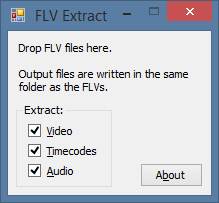
FLV Extract extracts video and audio from FLV files without decompressing or recompressing. The video is saved to AVI (H.263/FLV1 and VP6/VP6F are supported) and the audio is saved to MP3.
Step 2c - Create and Extract Animoto clips
The best practice:
a) to collect 30 450x550 resolution images (from e.g. fotosearch) for one particular topic,
b) to upload these images to animoto in sequence and in batch,
c) difference song/tempo will affect the animoto's choice of effect,
d) next step is identical to Step 2b.
Step 3 - Presentation = video clips + images + audio
Jumpcut (or similar tools) to stich the clips with the narration,
then, publish and embed the presentation.
SOP Summary
1 realplayer to extract the flv out
2 movica to cut into smaller clips
3. FLV_Extract to stripe voice (this also converts the clip to .avi)
4. jumpcut to author the whole presentation
Stock Library
Revostock
HBO
Subscribe to:
Posts (Atom)