This tutorial was posted originally on ZeForce.com.
Sunday, May 4, 2008

Friday, May 2, 2008
Blogger Email Notification upon a New Post
Blogger -> Setting -> Email allows the new post to be sent to an email (list), such as the group mail from google or yahoo. To create a blog in conjunction with the groups.google.com can be a very effective way for Non-Browser savvy community.
However, using group email is not a good way to broadcast beyond a small group. The better alternative is to trigger the email campaign server upon receiving the blogger change notice (email). Another future project in waiting.
However, using group email is not a good way to broadcast beyond a small group. The better alternative is to trigger the email campaign server upon receiving the blogger change notice (email). Another future project in waiting.
How do I figure out my iTunes Podcast URL?
Original post
On the iTunes podcast subscription page:

Right Click on the "Tell A Friend" on the right menu, and execute the "Copy iTunes Store URL" command. Paste the clipboard content.
As an example, here is the iTunes Podcast URL for my wordpodcast iTunes Store:
https://phobos.apple.com/WebObjects/MZFinance.woa/wa/tellAFriend?type=9&id=279475267
You can click on that link to get to the wordpodcast iTunes Store Invitation page.

If you click on the button "iTunes" in the middle of the image, you do invoke a URL that's fed to your Web browser, but if you have iTunes installed, it's already tweaked your browser to hand that URL to the iTunes program itself. This all happens in under a second, and the end result is that you click on the link in your email and the next thing you see is iTunes showing the page about your podcast:
On the iTunes podcast subscription page:

Right Click on the "Tell A Friend" on the right menu, and execute the "Copy iTunes Store URL" command. Paste the clipboard content.
As an example, here is the iTunes Podcast URL for my wordpodcast iTunes Store:
https://phobos.apple.com/WebObjects/MZFinance.woa/wa/tellAFriend?type=9&id=279475267
You can click on that link to get to the wordpodcast iTunes Store Invitation page.

If you click on the button "iTunes" in the middle of the image, you do invoke a URL that's fed to your Web browser, but if you have iTunes installed, it's already tweaked your browser to hand that URL to the iTunes program itself. This all happens in under a second, and the end result is that you click on the link in your email and the next thing you see is iTunes showing the page about your podcast:
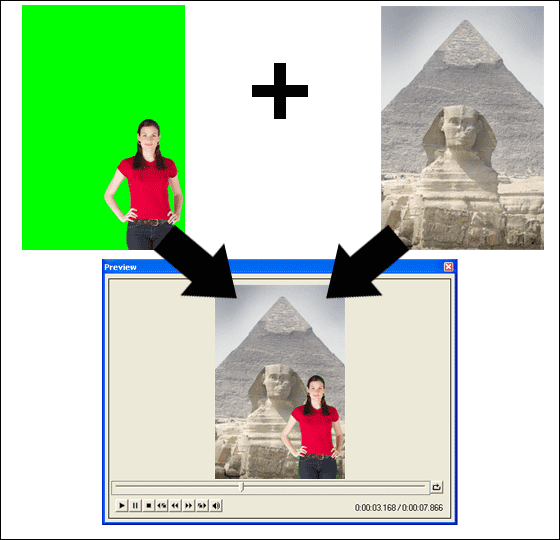
Background Removal
The Video Edit Magic v4.45 take out the pixels of a particular chrom, similar to the photoshop or fireworks works.
Download

The above player is the default blogger video player.
This is the technique that http://www.ixwebhosting.com/overlays the video on top of their website. This particular site embeds a cookie to your PC, so the flash show will not show up 2nd time around.
Download
The above player is the default blogger video player.
This is the technique that http://www.ixwebhosting.com/overlays the video on top of their website. This particular site embeds a cookie to your PC, so the flash show will not show up 2nd time around.
play podcast inside gmail
A new GMail feature lets you play MP3 files right inside the GMail homepage without having to download the MP3 song or open an external media player. You can use the Gmail MP3 player to embed MP3 files into your website or blog.
When you receive an MP3 audio file as an email attachment, click the play button and Google will play the audio file for you in a Gmail popup window.
The GMail Mp3 player is actually the Google video player that's playing the audio file. In fact, you can play any MP3 files from the embedded Google Video player without even having to login to GMail. Here's the secret URL:
http://mail.google.com/mail/html/audio.swf?audioUrl=MP3_URL
To embed MP3 songs in your Blog or website, use the following Google Video Player wrapper code:

Remember to replace MP3_URL with the actual location of the MP3 file on the web and play it inside Google Video. Odeo also provides an MP3 player that you can put into blogs but with Google, you can change the size of the MP3 inline player, background colors and autoplay mode with the parameters - backgroundColor=0xEEEEEE&autoPlay=true
The song shown in the Google MP3 Player screenshot is actually the 6kb Yahoo! Song. Like Odeo, you can embed any MP3 song or podcast via the Google Gmail MP3 player in your website.
When you receive an MP3 audio file as an email attachment, click the play button and Google will play the audio file for you in a Gmail popup window.
The GMail Mp3 player is actually the Google video player that's playing the audio file. In fact, you can play any MP3 files from the embedded Google Video player without even having to login to GMail. Here's the secret URL:
http://mail.google.com/mail/html/audio.swf?audioUrl=MP3_URL
To embed MP3 songs in your Blog or website, use the following Google Video Player wrapper code:
Remember to replace MP3_URL with the actual location of the MP3 file on the web and play it inside Google Video. Odeo also provides an MP3 player that you can put into blogs but with Google, you can change the size of the MP3 inline player, background colors and autoplay mode with the parameters - backgroundColor=0xEEEEEE&autoPlay=true
The song shown in the Google MP3 Player screenshot is actually the 6kb Yahoo! Song. Like Odeo, you can embed any MP3 song or podcast via the Google Gmail MP3 player in your website.
Thursday, May 1, 2008
How to make podcast blog from blogger
http://google.about.com/od/googleblogging/ss/podblogger.htm
The previous mistake was not to use atom and link field.
The previous mistake was not to use atom and link field.
SOP Listing
Thanks to the Diino, we do not have to repost the SOP listing here. All completed SOP are moved to http://podcast.diinoweb.com/files/SOP/ and is automatically sorted by the directory.
For example: (this clip can not be streammed, so will take a long time to come up)
The rest of files are located on
http://podcast.diinoweb.com/files/
Podcast 0, 1, ...., 9, a, b, c, d
For example: (this clip can not be streammed, so will take a long time to come up)
The rest of files are located on
http://podcast.diinoweb.com/files/
Podcast 0, 1, ...., 9, a, b, c, d
Subscribe to:
Posts (Atom)